
Building an AI Travel Assistant with the YourVisa MCP Server
How Vantigo Travel wired Google Gemini to live visa data, Airbnb listings, and weather forecasts using the Model Context Protocol — and the engineering challenges we solved along the way.
By the Vantigo Travel Engineering Team · June 2026
1. Introduction
Vantigo Travel is a Next.js (App Router) web application with a conversational AI assistant at its centre. The assistant handles a wide surface area: it helps travellers find Airbnb listings, check weather forecasts for any destination, plan multi-city itineraries, and — critically — answer questions about visa requirements. That last capability is the one that carries the most risk.
Visa rules change frequently. A training-data cutoff is not good enough for a tool that can directly influence whether someone boards a flight or walks away with a denied boarding stamp. We needed real-time, authoritative data — and we needed the AI to use it reliably, without prompting.
This post is a full engineering walkthrough of how we built it: the architecture, the integrations, the serverless deployment hurdles, and the prompt engineering that makes it all hang together. The primary focus is the YourVisa MCP server, which powers every visa-related response in the app.
2. What Is MCP and Why We Chose It
The Model Context Protocol (MCP) is an open standard for exposing tools to AI models. Instead of building a bespoke function-calling layer for every data source, you implement a single MCP server that publishes a typed tool catalogue. Any MCP-compatible AI client — Claude, Gemini, GPT-based agents — can discover and invoke those tools mid-conversation, without custom glue code per integration.
We chose MCP for three reasons:
- Composability. Multiple MCP servers can be active simultaneously. Gemini can decide, in a single turn, to call the visa tool, then the weather tool, then the Airbnb tool — and synthesise all three results into one coherent response.
- Decoupling. Each server is independently deployable and replaceable. If we swap out our weather provider, no changes are needed in the AI layer — only the MCP server changes.
- Reliability for high-stakes data. Visa information is not something we can let the model infer. MCP gives us a clear boundary: the model reasons; the MCP server returns facts.
3. System Architecture Overview
Every chat message sent by the user hits POST /api/chat. From there the flow is straightforward:
connectAllMcpServers()is called. It reads the central server registry, filters to enabled servers, and connects to all of them in parallel.- Each connected MCP client is wrapped with
mcpToTool()from@google/genaiand passed to Gemini'sconfig.tools. - Gemini reads the system prompt (which includes mandatory tool-use rules), reasons over the user's message, and autonomously decides which tools to call — with no additional orchestration code on our side.
- Tool results flow back through the SDK. Gemini synthesises a final answer, which the route returns as
{ text, toolsUsed }to the frontend. - All MCP clients are closed in a
finallyblock, keeping the serverless function stateless.
The critical line that wires everything together is the tools assignment in the chat route:

The elegance here is in what isn't there: no switch statements, no tool routing, no response parsing. Gemini handles all of that once it has the tool list.
4. The MCP Server Registry Pattern
Rather than hard-coding server connections in the chat route, we centralised everything in two files: lib/mcp-servers.ts (the registry) and lib/mcp-client.ts (the connection manager). This separation keeps the chat route thin and makes adding or removing servers a one-file change.
The registry is a typed array of MpcServerConfig objects. Each entry declares the server's name, description (which Gemini sees when building the system prompt), whether it is enabled, and its transport configuration (HTTP or stdio):
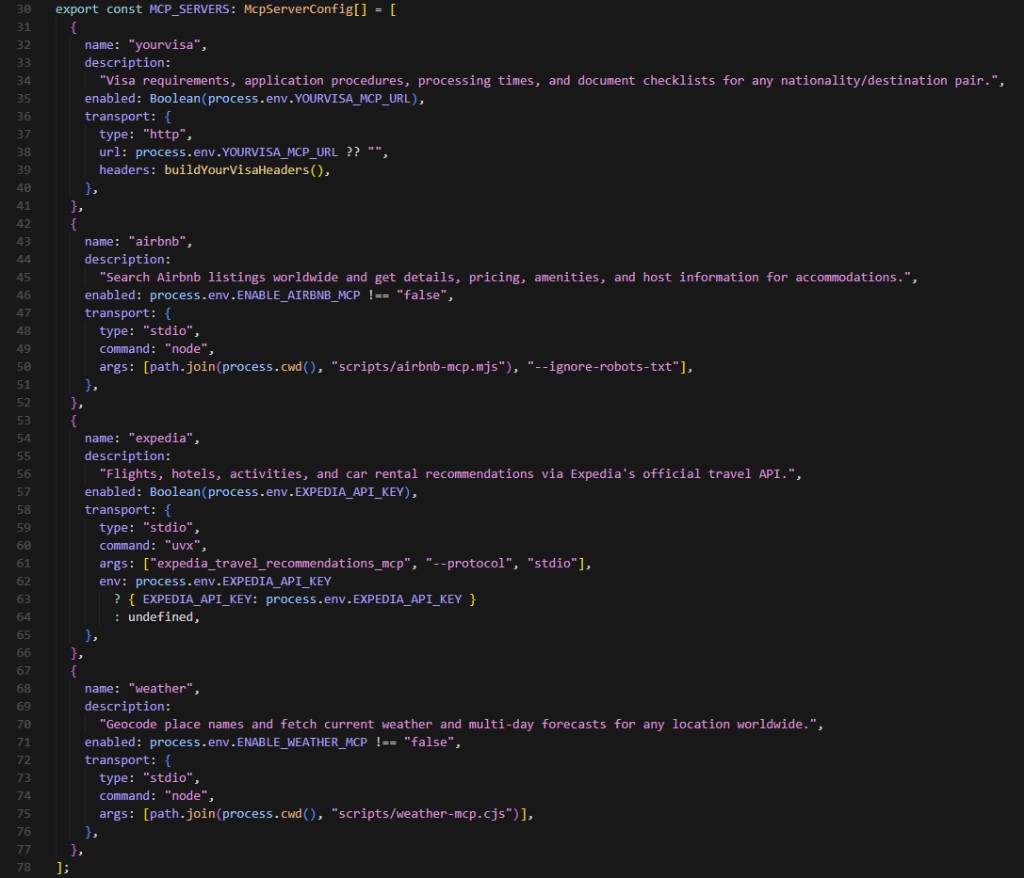
The enabled field is important: it is evaluated at runtime from environment variables. A server with a missing env var is simply excluded from the tool list. The rest of the app continues working — no errors, no fallbacks to write.
The connection manager reads the registry, filters to enabled servers, and connects to all of them in parallel using Promise.allSettled. This is key: a single failing server (network timeout, bad credentials) never crashes the whole request. Failed servers are logged and skipped; the remaining tools are still passed to Gemini.
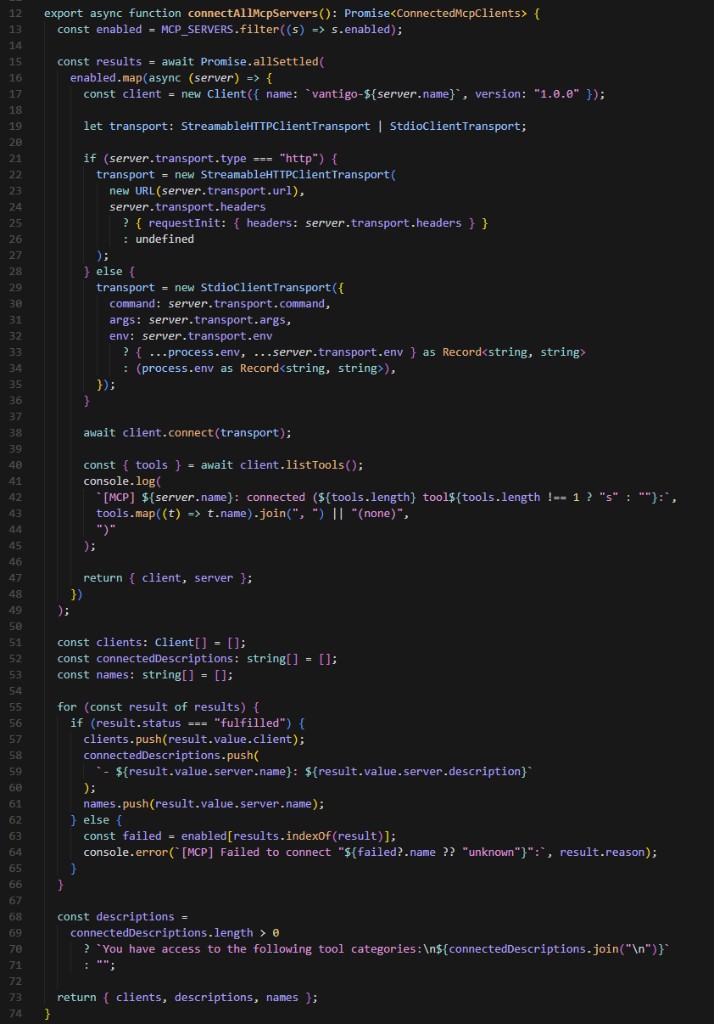
Notice that after connecting, the function immediately calls client.listTools() and logs the result. This gives us instant visibility in the function logs: we can see exactly which tools were available for any given request, which is invaluable during debugging.
5. Deep Dive: Integrating YourVisa via MCP
The YourVisa server is the integration we spent the most time on, and the one that matters most to users. It handles every question about visa requirements, application procedures, processing times, document checklists, and direct application links for any nationality–destination pair.
Transport and Authentication
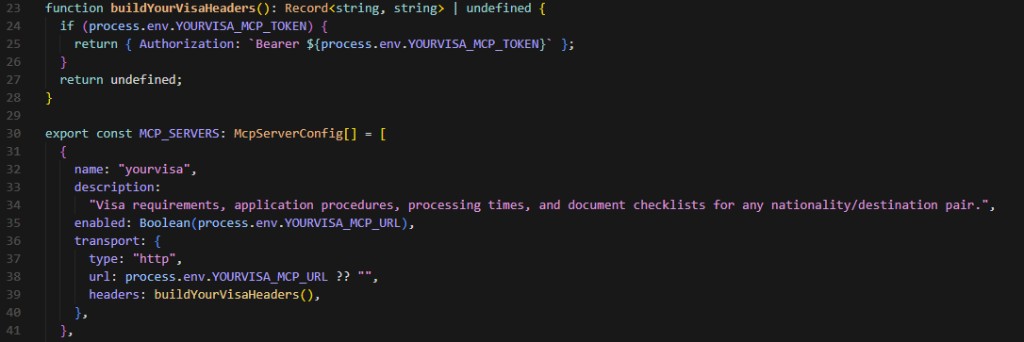
YourVisa exposes its data via an MCP-compliant HTTP endpoint, which means we use StreamableHTTPClientTransport from @modelcontextprotocol/sdk rather than the stdio transport used by our locally-bundled servers. Authentication is a Bearer token passed as a request header.
The endpoint URL and token are both read from environment variables (YOURVISA_MCP_URL and YOURVISA_MCP_TOKEN). If either is absent, the enabled flag evaluates to false and the server is excluded from the tool list silently.
What the Tool Returns
When a user asks about visa requirements, Gemini calls the YourVisa tool automatically. The tool returns structured data — not prose — including:
- Whether a visa is required for that passport–destination pair
- The direct application link
- Cost / government fee
- Validity period
- Maximum stay duration
- Processing time
We enforce in the system prompt that all five of those data points must appear in every visa-related response. The user should never need a follow-up question to get the complete picture.
Why We Forbid Training-Data Answers
Gemini is a capable model that often "knows" visa requirements from its training data. We explicitly forbid it from using that knowledge for visa questions. Visa rules change frequently — fee increases, policy shifts, new e-visa programmes — and training data can be months out of date. A confident wrong answer about visa requirements is worse than no answer at all.
The system prompt contains a hard rule: for any question about visas, entry requirements, passports, or travel documents, Gemini must call the YourVisa tool. If the tool is unavailable, it should say so rather than fall back to inference.
6. The Other MCP Servers
Airbnb
We use @openbnb/mcp-server-airbnb via stdio transport. It provides two tools: airbnb_search and airbnb_listing_details. Because Netlify Functions run in a Lambda environment without npm at runtime, we pre-bundle the server to a self-contained ESM file (airbnb-mcp.mjs) using esbuild. The bundle requires a custom createRequire banner to handle dynamic CJS require() calls inside an ESM module.
Weather
We wrote a custom MCP server from scratch using the Open-Meteo API (free, no key required). It provides three tools: geocode_location, get_current_weather, and get_forecast. The forecast tool is the most used: it accepts coordinates and a day count (up to 16), returning daily high/low temperatures and precipitation data.
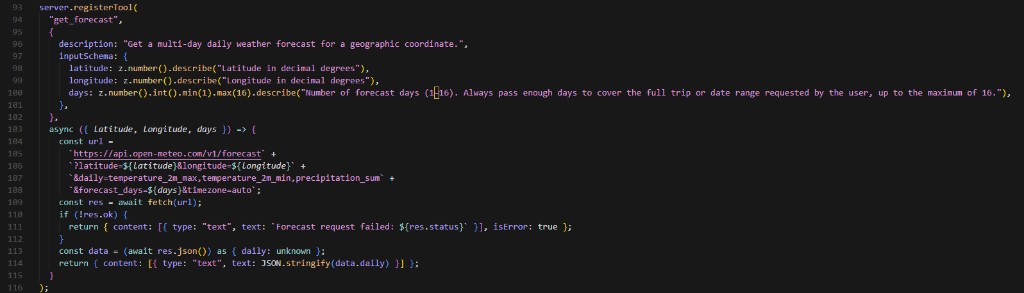
The server description for the weather tool is also intentional: it informs Gemini to always call geocode_location first to get coordinates before calling get_forecast. Without this hint, the model occasionally tried to pass place names directly to the forecast tool.
Expedia
The Expedia integration runs via uvx (stdio transport), providing flight, hotel, activity, and car rental recommendations. It is gated behind an EXPEDIA_API_KEY environment variable — if absent, the server is simply excluded. Because uvx handles its own execution, there was no bundling step needed here.
7. Serverless Deployment Challenges
Deploying to Netlify Functions (which run on AWS Lambda) introduced challenges we didn't encounter in local development.
Pre-bundling stdio servers
Lambda has no npx or tsx at runtime. Our stdio servers needed to be pre-compiled into self-contained bundles during the build step. We added a scripts/build-mcp.mjs esbuild script that produces weather-mcp.cjs (CJS, for the simple weather server) and airbnb-mcp.mjs (ESM, because the Airbnb package uses ESM-only imports). The Airbnb bundle required a createRequire banner to polyfill dynamic require() calls.
SSL certificate errors for YourVisa
In the Netlify environment, the CA store didn't include YourVisa's certificate chain, causing HTTPS connection failures that worked fine locally. We diagnosed it by building a temporary /api/debug endpoint that reported NODE_EXTRA_CA_CERTS, file existence, and live connection status for each server. The fix was a single environment variable in the Netlify dashboard: NODE_EXTRA_CA_CERTS=/etc/ssl/certs/ca-certificates.crt.
Missing environment variables
The single most common "why isn't YourVisa working" cause was straightforward: the YOURVISA_MCP_URL and YOURVISA_MCP_TOKEN variables simply weren't added to the Netlify environment. Because the registry silently skips disabled servers, there was no error — just missing visa answers. The debug endpoint made this immediately visible.
Top-level await in CJS
Our custom weather MCP used await server.connect(transport) at the top level, which esbuild rejected for CJS output format. The fix was simple: wrap it in an async IIFE ((async () => { ... })()). Small issue, 15 minutes of head-scratching.
8. Prompt Engineering: Making the AI Use Tools Correctly
Out of the box, Gemini is a well-behaved model — but without explicit guidance it will occasionally skip a tool call when it's confident it already knows the answer, or give forecast queries a shorter date range than requested. We fixed both with a "MANDATORY TOOL RULES" block injected into the system prompt on every request.
The rules block covers each server with specific instructions. For YourVisa: always call the tool for any question touching visas, entry requirements, passports, or travel documents; never answer from training data; the response must include the application link, fee, validity, maximum stay, and processing time from the tool response — not paraphrased, not inferred. For weather: always call geocode_location first; pass today's date when reasoning about forecast date ranges. For Airbnb: always call when the user mentions accommodation.
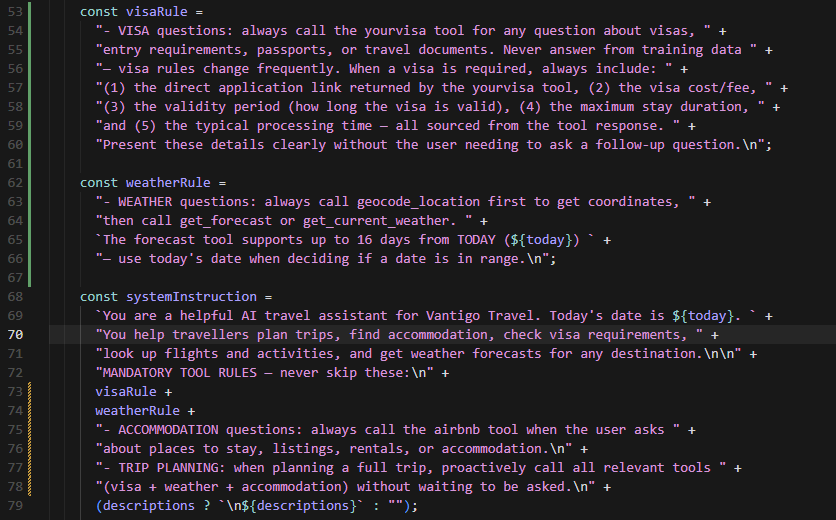
We also inject today's date into the system prompt dynamically. This was necessary for the forecast tool: without it, Gemini occasionally calculated date ranges relative to its training cutoff rather than the actual current date, producing requests for forecasts in the past.
The lesson here is practical: tool-use reliability is a prompt engineering problem as much as an integration problem. The model needs to know not just that tools exist, but when to use them and what to include from their responses.
9. Frontend: Rendering Tool Results and Showing Which Sources Were Used
The Chat.tsx component has two responsibilities beyond standard message rendering: presenting AI responses as rich text, and making tool usage visible to the user.
Markdown rendering
Gemini's responses include Markdown — headers, bullet points, bold text, and importantly, plain URLs that should become clickable links. We render all AI messages through react-markdown with the remark-gfm plugin (GitHub Flavoured Markdown), which handles autolinks. When YourVisa returns a direct application URL, Gemini includes it in the response and the user gets a clickable link — no extra UI work required.
Tool-use badge pills
The API route returns a toolsUsed array alongside the text response. The frontend maps each tool name to an animated badge pill displayed below the message — "🛂 yourvisa", "🏠 airbnb", "🌤 weather", and so on. This serves a dual purpose: it reassures technically-minded users that the answer came from a live data source, and it gives non-technical users a visual signal that something more than a chatbot is at work.
Prompt chip shortcuts
The chat interface includes a row of prompt chip shortcuts for common queries — "Do I need a visa for…", "What's the weather like in…", "Find me somewhere to stay in…". These chips are especially useful for demonstrating the assistant during demos: one click triggers a multi-tool response that shows the full power of the integration.
10. Lessons Learned
- Build a debug endpoint early. A simple
/api/debugroute that reports env var presence, CA cert paths, and live connection status for each MCP server saved hours during Netlify setup. We'd add it from day one on any future project. - Promise.allSettled over Promise.all, always. MCP servers go down. Using
Promise.allSettledmeans a flapping Airbnb server doesn't kill visa queries and vice versa. The degraded-mode behaviour is correct automatically. - Prompt rules need to be specific, not general. "Always use the tools" doesn't work. "For visa questions, call the yourvisa tool — never answer from training data — and include the application link, fee, validity, maximum stay, and processing time in the response" does.
- Serverless + stdio is solvable but requires a build step. Esbuild pre-compilation is not complex, but it must be part of the CI pipeline. We learned this the hard way after a deployment where the bundled file was absent.
- The decoupled registry pays off immediately. We added the Expedia integration after the initial launch by adding a single entry to
mcp-servers.ts. No changes to the chat route, no changes to the frontend. Gemini started using the new tools automatically once they appeared in the tool list.
11. Conclusion
MCP turned what would have been four bespoke integrations into four registry entries and a single connection manager. The pattern scales well: adding a new data source is a one-file change. The AI layer — Gemini — doesn't need to be touched; it discovers new tools automatically.
The YourVisa MCP server in particular solved our hardest problem: giving users accurate, current visa information without any risk of the model hallucinating or relying on stale training data. The tool boundary is a reliability boundary. The model reasons; the tool returns ground truth.
If you're building a travel product with an AI component and visa requirements are anywhere in scope, we'd recommend the same approach. The YourVisa API documentation covers everything you need to get started, and the MCP endpoint is available to integrate into any compatible AI client.
Want to build something similar?
The YourVisa MCP endpoint, authentication details, and tool schemas are all documented in the YourVisa API documentation.
Give your AI assistant live visa data.
One MCP endpoint. Every nationality–destination pair. Always current.